


 Damage
  Loss
Loss  Theft
Theft 


How to Expand Your Power Station with Cheaper LiFePO4 Batteries
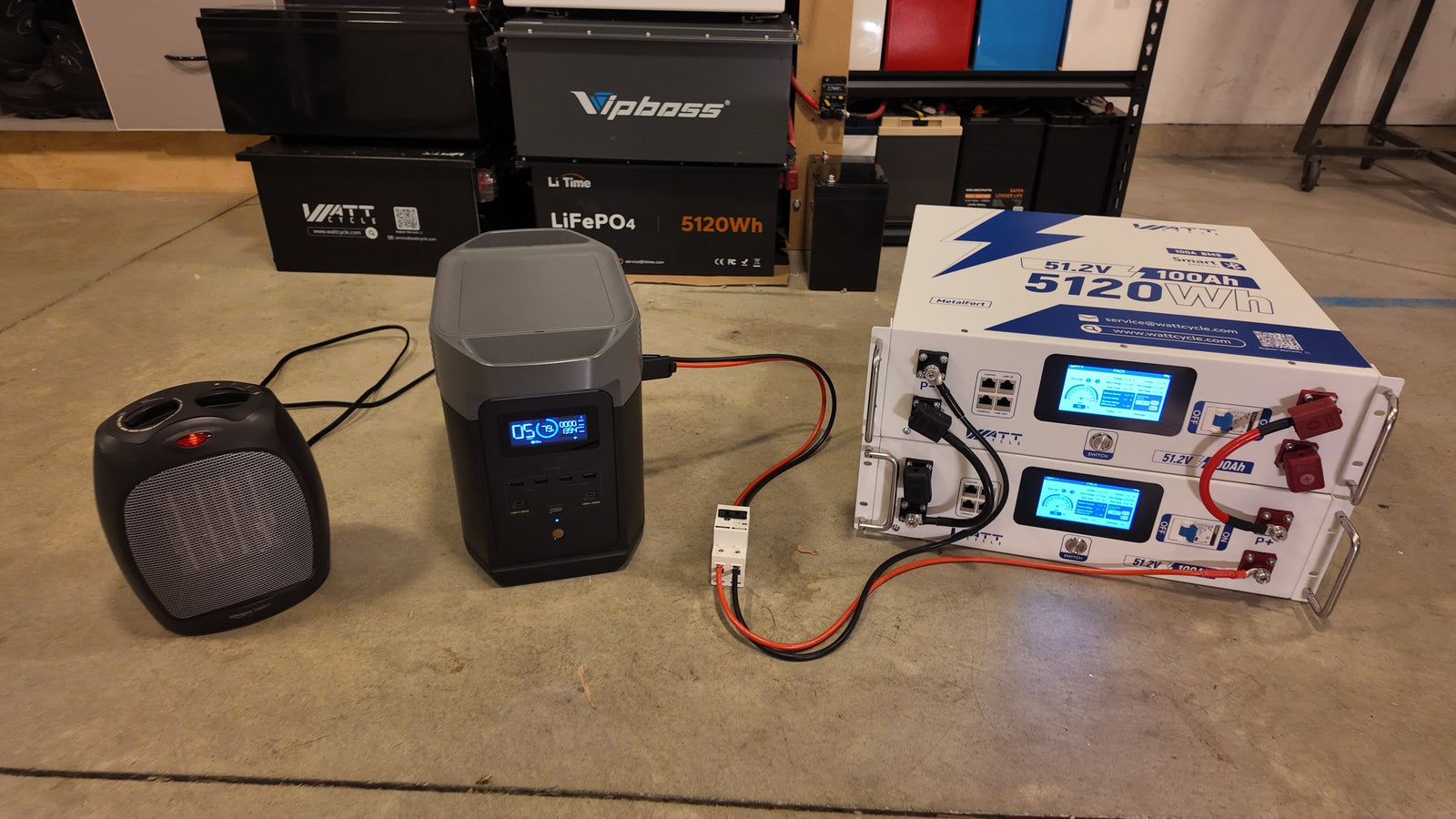
Running out of stored energy is arguably the most common headache for portable power station owners. Whether you are caught in the middle of an extended blackout, camping deep in the backcountry, or simply pushing your setup harder than expected, that dreaded low-battery notification always seems to arrive at the worst possible moment. Official expansion batteries from the original manufacturer certainly solve the problem, but their sky-high prices and proprietary restrictions leave many buyers searching for a smarter path forward.
This guide walks you through how to connect a more affordable LiFePO4 battery to your power station using the dedicated Extra Battery Port. We will break down every critical technical checkpoint — from voltage matching and chemistry consistency to wattage caps and connector types — so you can make a confident, well-informed decision without risking your equipment.
What Is an Extra Battery Port?
Most modern portable power stations ship with a dedicated Extra Battery Port — a connection point engineered specifically to shuttle DC energy back and forth between the main unit and a supplementary battery pack. These ports handle two jobs at the same time: first, they move raw power between the internal cells and the external pack; second, when paired with an official expansion battery, they enable a shared communication channel that lets the host screen display combined capacity, synchronize charge and discharge curves, and coordinate the two battery management systems as a single unit.
When you opt for a less expensive third-party LiFePO4 pack instead of the branded accessory, you are still tapping into that same DC power bridge — and that is a completely legitimate approach. The trade-off is that you step outside the proprietary handshake, which means you need to understand a handful of strict compatibility rules and accept certain display limitations on the host screen.
The DIY Trade-off: What You Sacrifice and What You Gain
Because every brand relies on its own proprietary communication protocol, a generic LiFePO4 battery plugged into the Extra Battery Port will not be recognized by the host software. The front display will continue showing only the internal battery's state of charge rather than a merged percentage that accounts for both packs.
What you receive in return is meaningful: freedom from premium pricing and brand lock-in. You can redirect your entire budget toward raw usable capacity and cell quality, frequently ending up with the same — or even double — the total energy storage at a fraction of the branded alternative's cost.
You also break free from fixed-capacity options. Instead of settling for whatever single SKU the manufacturer sells, you can hand-pick a LiFePO4 pack sized precisely to your real-world needs — anything from a compact weekend-trip supplement to a beefy multi-kilowatt-hour reserve for extended off-grid living.
IMPORTANT NOTICE
Before connecting any external battery, you must complete every compatibility verification outlined below. These are non-negotiable prerequisites for a safe, fully functional system — not mere suggestions.
Mandatory Compatibility Checks
Port Confirmation
Verify that your power station actually includes a dedicated Extra Battery Port that is physically distinct from the solar input. Although both are DC connections, the input jack, its voltage rails, and even the plug shape are different. Never attempt to use a standard solar or car-charge port as a substitute — doing so can damage the internal circuitry.
Voltage Match
The nominal voltage of your external LiFePO4 battery must be an exact match to the power station's internal battery. This requirement exists because the Extra Battery Port wires the two packs in parallel on a shared DC bus. A mismatch — even a small one — can trigger uncontrolled current surges, confuse the battery management system, trip safety shutdowns, or cause irreversible cell damage. Always cross-reference the manufacturer's spec sheet (common ratings include 12V, 24V, 48V, and occasionally 51.2V) before committing to a purchase.
Chemistry Consistency
Both the internal cells and your expansion pack must share the same lithium-iron-phosphate (LiFePO4) chemistry. Other lithium variants — such as NMC or NCA — operate on fundamentally different voltage curves and charge profiles. Mixing chemistries creates dangerous imbalances that can lead to overcharging one pack while under-charging the other, so stick with LiFePO4 across the board.
Power Limits: Port Input vs. Battery Output
Every Extra Battery Port is rated for a specific maximum input power — typically somewhere between 500 W and 1800 W depending on the model. Even if your external LiFePO4 pack is capable of dumping 2000 W or more, the port itself becomes the bottleneck. The power station will only pull energy up to the port's rated ceiling, and pushing a battery that far exceeds that ceiling can stress connectors and trigger thermal safeguards.
This ceiling also dictates how quickly the combined system can recharge. A higher-rated port means faster throughput from your expansion pack; a lower-rated port means you gain runtime rather than peak delivery speed. Always confirm both the port's wattage cap and the external battery's maximum discharge rate before finalizing your setup.
Connectors and Adapters
Successfully bridging your expansion battery to the Extra Battery Port demands the right physical interface and proper safety hardware. This is not a universal plug-and-play scenario — using makeshift cables or ill-fitting connectors can result in arcing, overheating, or even fire.
The physical connector on the power station's Extra Battery Port is almost always a brand-specific proprietary plug. Whether it is a custom multi-pin connector from Bluetti, Anker, EcoFlow, or another manufacturer, it will differ from standard solar input jacks like XT60 or MC4. You will need to source the correct adapter cable — or in some cases build one — to ensure a safe, secure, and low-resistance connection.
Essential Tools
Charging Your Expanded System
Replenishing the combined setup is refreshingly straightforward and can be handled through two primary methods.
Using an Internal Charger: Plug a standard LiFePO4 battery charger directly into your expansion pack. In the Bluetooth app, keep your expansion battery in the discharging state. Both the external pack and the power station's internal cells will charge at the same time through the shared DC bus, giving you the fastest possible refill.
Keep in mind that some charging voltages are close enough to the expansion battery's resting voltage that it may not immediately accept incoming charge. If that happens, manually toggle the expansion battery to its charging state in the Bluetooth app. You can track its progress via the app or the battery's own built-in display.
One thing to remember: this DIY expansion creates two independent management systems. The power station's screen reflects only its own internal state of charge, so you will need to check the expansion battery's Bluetooth app or LCD panel separately. For the entire system to function correctly — whether discharging to run devices or charging from the wall — the DC circuit breaker in your adapter cable must always remain in the "ON" position to maintain the electrical bridge between the two units.
Why Choose a WattCycle Server Rack Battery for Expansion?
A WattCycle 51.2V 100Ah Server Rack Battery is purpose-built to be the ideal expansion companion for DIY power station upgrades — engineered from the ground up to overcome the limitations that plague generic third-party packs.
It delivers outstanding value where it matters most: cost per usable unit of energy. At roughly 5.12 kWh of storage — often at a fraction of the per-watt-hour price of a brand-matched expansion module — it translates to multiples of the total capacity for the same budget, or the same capacity for dramatically less money.
Its integrated high-definition LCD touchscreen provides real-time local monitoring so you never have to guess about the expansion pack's status. You get a clear overview of State of Charge, voltage, and current at a glance, turning a key compromise of the DIY approach into a non-issue.
For even deeper insight, the companion WattCycle Bluetooth App enables remote monitoring and granular management. This is especially useful during charging cycles, where you can manually switch the battery's operating mode through the app to ensure it seamlessly accepts incoming energy from your power station — guaranteeing the entire system charges completely and efficiently.
Disclaimer & Compatibility Notice
This guide is provided for educational purposes only. Connecting a third-party battery to your power station may void the manufacturer's warranty. Always consult your power station's official documentation and follow all safety guidelines before attempting any modification. Backyard Provider is not liable for damage, injury, or warranty issues resulting from DIY expansion setups. Proceed at your own risk and ensure all components meet the specifications outlined above.
Featured Product
Ready to Expand Your Power Station?
Get the official EcoFlow DELTA Pro Smart Extra Battery and unlock seamless, plug-and-play expansion for your setup.
EcoFlow DELTA Pro Extra Battery