


 Damage
  Loss
Loss  Theft
Theft 


Buyer's Guide to Projectors: Three Easy Steps to Pick the Right Meeting Room Projector
From home offices to enterprise boardrooms, business projectors are opening up new possibilities for how teams meet, pitch, and collaborate. With today's business environments becoming increasingly varied, projector manufacturers have rolled out a wide mix of design and functional innovations to match. When picking the right unit, start by evaluating your conference room size and lighting environment, then review your installation needs, and finally match the projector to your business workflow. These three simple steps help home-office professionals, small business owners, and large corporations alike land on the ideal projector to unlock more opportunities.
Step One: Pick a projector based on room size and required brightness.
Step Two: Choose a projector that fits your installation setup.
Step Three: Match the projector to your business workflow.
Select a Projector Based on Conference Room Size and Brightness
Brightness is one of the most important specs to evaluate when choosing a projector for business use. For smaller meeting spaces seating around 10 people, a projector in the 3,000–3,499 lumen range delivers a healthy balance of energy efficiency and crisp image clarity. Medium-sized rooms accommodating roughly 20 participants benefit from 3,500–5,000 lumens, enough to support more viewers and a larger projected image. For large conference rooms hosting 40 or more attendees, an ultra-bright projector above 5,000 lumens provides the brightness and visual clarity you need. If the room has strong ambient lighting, plan on adding around 1,000 lumens to your target to keep presentations sharp with the lights on.
3,000+ ANSI Lumens for focused team meetings and small huddle spaces.
3,500+ ANSI Lumens to cover larger screens and wider audiences.
5,000+ ANSI Lumens for boardrooms, training halls, and auditoriums.
Choose a Projector Based on Installation Requirements
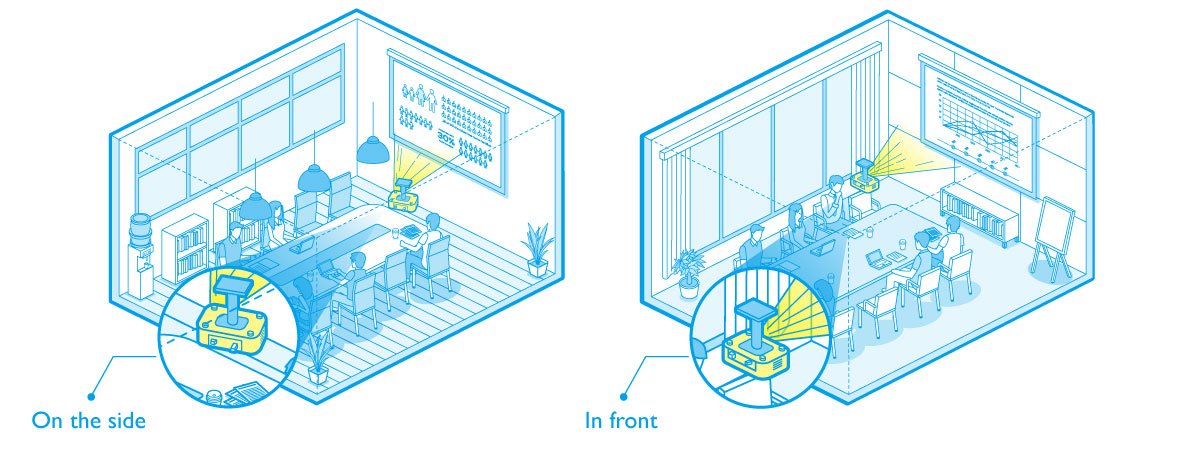
In a business setting, a projector often needs to move between conference rooms — or even travel to client meetings. That makes it critical to pick a unit designed for how and where it will actually be used. In meeting rooms where the projector sits directly in front of the screen, a model with vertical keystone correction makes aligning the image straightforward. In tighter meeting spaces where placing the projector directly in front of the screen isn't practical, a model that offers both horizontal and vertical keystone correction, along with side-projection capability, can maintain the correct image aspect ratio whether the projector is positioned to the left or the right of the screen.
For rooms where the projector must be mounted off-axis, look for horizontal plus vertical keystone correction and side-projection support to preserve image geometry.
In traditional setups with the projector centered in front of the screen, vertical keystone correction is typically enough to produce a clean, aligned image.
Choose a Projector to Match Your Business Workflow
Today's projector lineup covers a broad range of business needs. For meetings that rely on a single, static setup, a wired connection model is usually enough to handle everyday presentation tasks in one location. If your team often connects to smartphones, tablets, or laptops to stream presentation content, prioritize wireless transmission capability. For larger organizations running dedicated projectors across multiple conference rooms, models with LAN connectivity and remote management features make it easier to monitor and control an entire fleet of projectors from a central point.
Reliable, simple, and well-suited to single-room setups and routine presentations.
Ideal for casting from laptops, tablets, and phones across flexible spaces.
Centralized management and monitoring for multi-room deployments.