


 Damage
  Loss
Loss  Theft
Theft 


How To Use The Autel KM100 Key Programmer: The Complete Guide
The Autel MaxiIM KM100 key programmer is a powerful and versatile automotive tool designed to handle universal key generation with remarkable ease. This compact device supports an extensive range of vehicle makes including Toyota, Honda, Ford, Chevrolet, Nissan, Hyundai, Kia, Volkswagen, and many more. Whether you are a professional locksmith or an automotive enthusiast, the KM100 delivers exceptional functionality for key cloning, transponder programming, and IMMO functions.
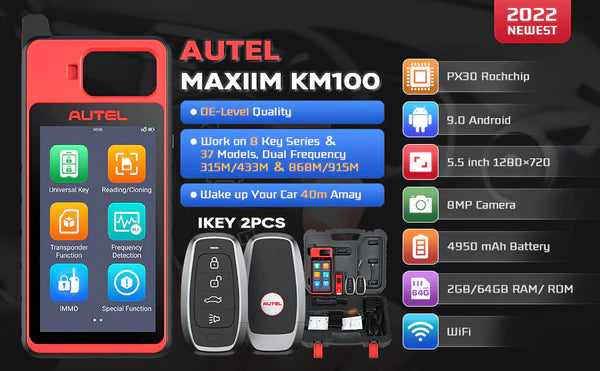
How to Use the Autel MaxiIM KM100 Key Programmer
Autel Smart Key Generating Steps
Follow these essential steps to generate a smart key using your KM100 device:
- Connect the programmer to the vehicle using the OBD-II port
- Power on the device and navigate to the main menu
- Select the appropriate vehicle manufacturer from the list
- Choose the specific model and year of the vehicle
- Follow the on-screen instructions to complete key generation
- Insert the blank key into the designated slot when prompted
- Wait for the programming process to complete successfully
- Test the newly programmed key with the vehicle

Autel Smart Key Programming Steps
The programming process involves several critical procedures that must be followed precisely for successful key duplication:
Step 1: Prepare the key by selecting the correct key type and verifying compatibility with your vehicle model.
Step 2: Access the IMMO function from the main menu and select the key programming option.
Step 3: Follow the guided procedure to read the vehicle data and prepare for key writing.
Step 4: Complete the programming sequence and verify the key functions properly with the vehicle.

How to Clone a Smart Key Using the Autel KM100 Key Programmer
Key cloning is one of the most valuable features of the Autel KM100. This process allows you to create an exact duplicate of an existing key, which is particularly useful when customers need spare keys or when the original key is showing signs of wear.
The cloning procedure involves:
- Reading the original key data using the integrated key reader
- Storing the key information securely within the device memory
- Selecting a compatible blank key for the duplication process
- Writing the stored data onto the new blank key
- Verifying the cloned key functions identically to the original
- Testing the new key with the vehicle to confirm proper operation

Password Calculation and Security Features
The KM100 includes advanced password calculation capabilities that allow the device to work with vehicles that have enhanced security protocols. The process begins with the device reading the necessary vehicle data to determine the appropriate security algorithm.

How to Adjust Autel Smart Key Buttons
The Autel smart key programmer allows you to adjust button configurations on your key fob. This feature is particularly useful when customizing key functionality to match specific vehicle requirements or user preferences. The button adjustment process enables you to configure lock, unlock, trunk release, and panic functions according to the vehicle specifications.
Key button adjustment steps:
- Access the key configuration menu from the main interface
- Select the button you wish to modify from the available options
- Choose the desired function for each button position
- Confirm the changes and save the new configuration
- Test each button to verify proper functionality

Final Thoughts
The Autel KM100 Universal Key Programmer stands as an essential tool for anyone working with automotive key systems. Its comprehensive feature set, intuitive interface, and broad vehicle compatibility make it a valuable addition to any professional toolkit. Whether you need to generate new keys, clone existing ones, or adjust button configurations, the KM100 delivers reliable performance and consistent results.